This post is also available in Chinese.
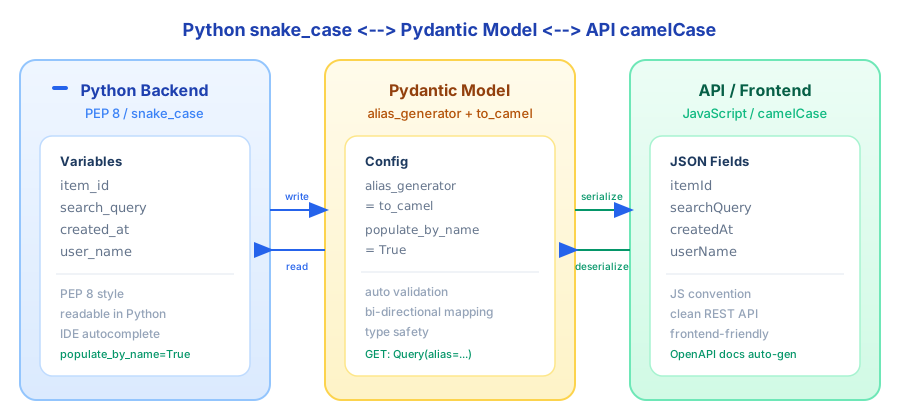
Every Python backend developer has had this conversation: you write item_id in your code, the API returns item_id in JSON, and then a frontend colleague asks — "Can you change that to itemId? We use camelCase in JavaScript."
You can either manually map every field (tedious and error-prone), or make the frontend deal with underscores (ugly in JS). Neither option is great.
Pydantic solves this with a single config line.
The Problem
Two naming conventions, both perfectly reasonable:
- Python (PEP 8):
snake_case—item_id,search_query,created_at - JavaScript / REST APIs:
camelCase—itemId,searchQuery,createdAt
Both are standard in their ecosystems. Forcing either side to adopt the other's convention creates friction. The right approach: keep snake_case in your Python code, expose camelCase in your API, and let Pydantic handle the conversion automatically.
GET Requests: Use Query's alias Parameter
GET parameters come through the URL query string, and there are usually just a few. For this, use Query with alias to map each one:
from fastapi import FastAPI, Query

app = FastAPI()

@app.get("/items/")
async def get_item(
    item_id: int = Query(..., alias="itemId"),
    search_query: str | None = Query(None, alias="searchQuery"),
):
    return {"item_id": item_id, "search_query": search_query}
The frontend calls:
GET /items/?itemId=42&searchQuery=example
Inside the handler, you get item_id=42 and search_query="example" — clean PEP 8 names throughout your Python code.
Response:
{
  "item_id": 42,
  "search_query": "example"
}
Note that the response JSON still uses snake_case here. If you want the response in camelCase too, you'll need a response_model backed by a Pydantic model — which we'll cover next.
POST Requests: Use alias_generator for Bulk Conversion
POST request bodies typically have more fields. Writing alias for each one is tedious. Pydantic's alias_generator lets you configure it once at the model level and every field converts automatically:
from fastapi import FastAPI
from pydantic import BaseModel, ConfigDict, Field
from pydantic.alias_generators import to_camel

app = FastAPI()

class ItemCreate(BaseModel):
    model_config = ConfigDict(
        alias_generator=to_camel,
        populate_by_name=True,
    )

    item_id: int = Field(..., description="The ID of the item")
    search_query: str | None = Field(None, max_length=50, description="A search query")
    created_at: str | None = Field(None, description="Creation timestamp")

@app.post("/items/")
async def create_item(item: ItemCreate):
    return item
Three key settings:
alias_generator = to_camel: Automatically mapsitem_idtoitemId,search_querytosearchQuery, and so on for every field.populate_by_name = True: Allows both snake_case and camelCase for input. Without this, only camelCase would be accepted.to_camel: A built-in conversion function frompydantic.alias_generators.
Frontend sends a POST:
POST /items/
Content-Type: application/json

{
  "itemId": 42,
  "searchQuery": "example",
  "createdAt": "2025-02-05T10:00:00Z"
}
In the handler, item.item_id is 42, item.search_query is "example" — snake_case all the way through your Python code.
Response (since alias_generator also affects serialization, it outputs camelCase automatically):
{
  "itemId": 42,
  "searchQuery": "example",
  "createdAt": "2025-02-05T10:00:00Z"
}
Making GET Responses camelCase Too
As mentioned, a plain return {"item_id": ...} from a GET handler produces snake_case in the response. To unify it, add a response_model:
class ItemResponse(BaseModel):
    model_config = ConfigDict(
        alias_generator=to_camel,
        populate_by_name=True,
    )

    item_id: int
    search_query: str | None = None

@app.get("/items/", response_model=ItemResponse)
async def get_item(
    item_id: int = Query(..., alias="itemId"),
    search_query: str | None = Query(None, alias="searchQuery"),
):
    return ItemResponse(item_id=item_id, search_query=search_query)
Now the GET response is camelCase too:
{
  "itemId": 42,
  "searchQuery": "example"
}
Extract a Base Class
If multiple models in your project need camelCase conversion, repeating model_config everywhere gets old fast. Extract a base class:
from pydantic import BaseModel, ConfigDict
from pydantic.alias_generators import to_camel

class CamelModel(BaseModel):
    """Base model for all models that need camelCase API serialization."""
    model_config = ConfigDict(
        alias_generator=to_camel,
        populate_by_name=True,
    )

# Just inherit from it
class ItemCreate(CamelModel):
    item_id: int
    search_query: str | None = None
    created_at: str | None = None

class UserProfile(CamelModel):
    user_name: str
    email_address: str
    is_active: bool = True
Every model inheriting CamelModel gets camelCase aliases for free.
Gotchas
A few things that can trip you up:
by_aliaswhen serializing manually: If you callmodel.model_dump()yourself, it outputs snake_case by default. For camelCase, usemodel.model_dump(by_alias=True). FastAPI'sresponse_modelhandles this automatically.Nested models:
alias_generatoronly affects the current model's fields, not nested ones. Nested models need their ownalias_generatorconfig — another reason to use the base class approach.ORM integration: If you use SQLAlchemy or similar, keep ORM models in snake_case and let Pydantic models handle the conversion. Don't mix naming conventions at the ORM layer.
OpenAPI docs: With
alias_generatorconfigured, FastAPI's auto-generated Swagger UI shows camelCase field names. Frontend developers see exactly the names they need — no guesswork.
Summary
The rule is simple: write snake_case in Python, expose camelCase in your API, let Pydantic bridge the gap.
The practical setup:
- For GET params (few fields):
Query(alias="camelCase")per field - For POST bodies (many fields):
alias_generator = to_camelat the model level - Add
populate_by_name = Trueso both naming styles are accepted as input - Extract a
CamelModelbase class and reuse it across the project
Both sides write idiomatic code, and Pydantic handles the translation in between.