Upgrading Python versions is supposed to be routine — until all your SSL connections break at once.
That's exactly what happened when I upgraded a project from Python 3.8 to 3.11. Code that had been running fine for over a year started throwing certificate verify failed on every HTTPS request. After some digging, I found out the certificates were fine. Python itself had quietly tightened its SSL defaults starting in 3.10.
This post walks through the debugging process, what actually changed, and three approaches to fix it.
The Symptom: SSL Suddenly Broken
The project uses aiohttp for HTTPS requests, with the SSL context configured like this:
import ssl

context = ssl.create_default_context(ssl.Purpose.CLIENT_AUTH)
context.load_cert_chain(certfile="mycertfile", keyfile="mykeyfile")
Under Python 3.8, this worked perfectly for over a year. After upgrading to 3.11, every request failed:
aiohttp.client_exceptions.ClientConnectorCertificateError:
  Cannot connect to host example.com:443 ssl:True
  [SSLCertVerificationError: certificate verify failed:
   unable to get local issuer certificate]
My first thought was an expired certificate. Nope — same files, same server, nothing had changed on the infrastructure side. The problem had to be on the client: Python itself.
What Actually Changed
After reading through the Python changelog and ssl module docs, I found the answer. The key changes happened in Python 3.10 (PEP 644), and 3.11 inherited them.
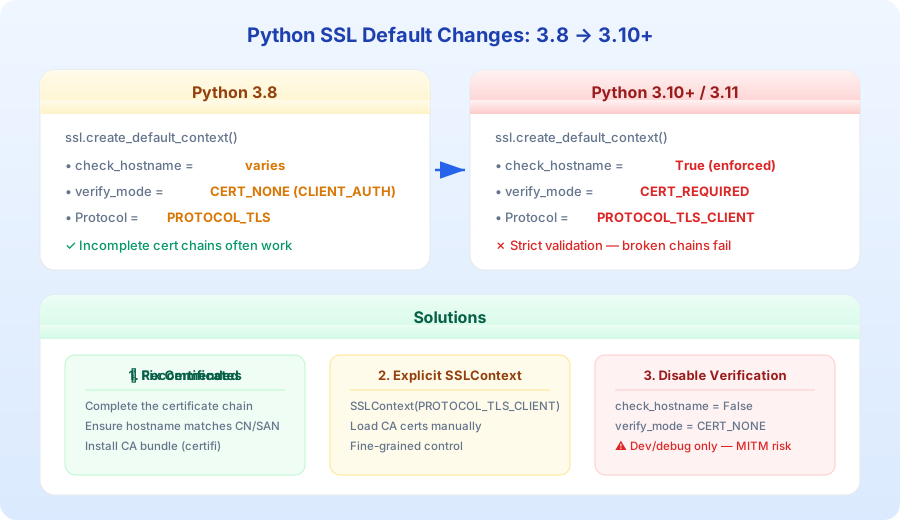
Change 1: Stricter Default Protocol
Python 3.8's ssl.create_default_context() used PROTOCOL_TLS — a general-purpose protocol that works for both client and server connections.
Python 3.10+ switched to PROTOCOL_TLS_CLIENT, which is specifically designed for client connections and enforces certificate verification by default.
Change 2: check_hostname Now On by Default
In 3.8, creating a context with ssl.Purpose.CLIENT_AUTH left check_hostname as False — it wouldn't verify that the server certificate's hostname matched the actual host you're connecting to.
In 3.10+, check_hostname defaults to True regardless of the Purpose parameter. If the certificate's CN (Common Name) or SAN (Subject Alternative Name) doesn't match the hostname, the connection fails immediately.
Change 3: verify_mode Defaults to CERT_REQUIRED
Under 3.8 with CLIENT_AUTH, verify_mode was CERT_NONE — it didn't validate the server certificate at all. An incomplete certificate chain, a missing root CA — none of that mattered.
In 3.10+, it's CERT_REQUIRED. Python now demands a complete, valid certificate chain. If it can't find the issuing CA certificate, you get the unable to get local issuer certificate error.
The One-Liner Summary
Python 3.8 trusted everything by default. Python 3.10+ trusts nothing. Your old code "worked" not because the certificates were configured correctly, but because validation was turned off.
Debugging Steps
Here's the process I followed to track this down. If you hit a similar issue, this sequence should help:
Step 1: Rule Out Certificate Problems
Use openssl to check the server certificate directly:
openssl s_client -connect example.com:443 -showcerts
If you see Verify return code: 0 (ok) in the output, the certificate itself is fine. The problem is on the Python side.
Step 2: Check Python's CA Certificate Path
import ssl
print(ssl.get_default_verify_paths())
Output looks something like:
DefaultVerifyPaths(
  cafile='/opt/homebrew/etc/openssl@3/cert.pem',
  capath='/opt/homebrew/etc/openssl@3/certs',
  ...
)
Make sure those paths actually contain CA certificate files. This is a common gotcha on macOS — the system OpenSSL and Homebrew's OpenSSL use different certificate locations.
Step 3: Compare SSLContext Defaults Between Versions
import ssl

ctx = ssl.create_default_context(ssl.Purpose.CLIENT_AUTH)
print(f"protocol: {ctx.protocol}")
print(f"check_hostname: {ctx.check_hostname}")
print(f"verify_mode: {ctx.verify_mode}")
Run this under both Python 3.8 and 3.11. The difference in output tells you exactly what changed.
Three Ways to Fix It
Option 1: Fix the Certificate Chain (Recommended)
The right approach. Make the certificate chain complete so validation passes:
import ssl
import certifi

context = ssl.create_default_context(cafile=certifi.where())
context.load_cert_chain(certfile="mycertfile", keyfile="mykeyfile")
certifi is a well-maintained CA certificate bundle, installable via pip. It eliminates dependency on system CA paths and works consistently across platforms.
pip install certifi
Option 2: Manual SSLContext Configuration
For more fine-grained control, build the SSLContext yourself:
import ssl

context = ssl.SSLContext(ssl.PROTOCOL_TLS_CLIENT)
context.load_verify_locations("/path/to/ca-bundle.crt")
context.load_cert_chain(certfile="mycertfile", keyfile="mykeyfile")

# With aiohttp
import aiohttp
connector = aiohttp.TCPConnector(ssl=context)
async with aiohttp.ClientSession(connector=connector) as session:
    async with session.get("https://example.com") as resp:
        print(await resp.text())
Option 3: Disable Verification (Debug Only)
For quick local debugging only:
import ssl

context = ssl.SSLContext(ssl.PROTOCOL_TLS_CLIENT)
context.check_hostname = False
context.verify_mode = ssl.CERT_NONE
context.load_cert_chain(certfile="mycertfile", keyfile="mykeyfile")
Warning: This exposes your connection to man-in-the-middle attacks. Use only for local debugging. Never ship this to production. Your code review process should catch it if someone tries.
A Gotcha You Might Miss: CA Paths on macOS
macOS users need to pay extra attention. If you installed Python via Homebrew, it links against a different OpenSSL than the system one. This means Python might not find the CA certificates in your system Keychain.
The simplest fix is certifi:
import certifi
print(certifi.where())
# Something like: /path/to/python/site-packages/certifi/cacert.pem
Pass that path to ssl.create_default_context(cafile=certifi.where()) and you're good.
Takeaways
Python 3.10+ tightening SSL defaults is a good thing — it forces you to handle certificate validation properly instead of pretending the problem doesn't exist. But if you're upgrading from 3.8, the change can be abrupt.
Key points:
ssl.create_default_context()behavior changed in 3.10 —check_hostnameandverify_modeare now strict by default- Verify it's a client-side issue first — use
openssl s_clientto rule out server certificate problems - Fix the certificate chain instead of disabling verification —
certifiis the easiest path - Watch out for CA paths on macOS — Homebrew Python and system Python use different certificate locations